顯示包含「系統美化」標籤的文章。顯示所有文章

2010年10月27日星期三

T3Desk 10.09 在windows中享受3d切換效果


T3Desk是一個很酷的免費軟件,你可以最大限度地縮小或"3D化"你的桌面應用程序,使桌面在3D視圖中成為半透明的窗口。你可以儘量縮小 任何應用程序窗口顯示為三維界面,可以對它們進行,翻轉、移動、縮放操作。T3Desk佔用的系統資源較低,除了透明效果,你還可以設置動作、聲音,初始 角度,過渡效果等,是桌面玩家的必備免費軟件之一。

T3Desk lets you manage your applications more easily in a 3D desktop adding the third dimension to your Windows screen.
"3Dmized" windows will appear in three dimensions and transparent on your screen and have the ability to be flipped, zoomed, moved, swiveled in almost anyway you want. T3Desk is lightweight on your resources, unlike most applications of its kind.
With T3Desk you can set the options regarding display, zooming, hot keys and sounds. You can configure your 3D window animation, transparency effect, the 3D initial angle and distance, the transition effects and more.


下載地址(download link):
http://download.cnet.com/3001-2346_4-75001019.html?spi=9a049cae733c316c73b5a2fda6dcb58b

2010年10月9日星期六

Winstep Nexus Dock 10.9 美化你的桌面


The Winstep Nexus Dock is a free Windows dock application that provides fast access to your most frequently used applications, with flexible options allowing it to dock or float anywhere on the screen. Every feature you would expect from a dock and then more, including widgets, many different mouse-over effects, skins, drag-and-drop, ability to display running applications and the system tray, Windows 7 "superbar" ability with Aeropeek, live icon reflections and support for Windows Aero Glass effects.

NeXuS是WinStep出品的一款桌面Dock軟件,是最有吸引力、最強大、彈性最大的一個桌面美化工具,提供了更友好的界面,讓你的桌面體驗更生動和有趣。Winstep Nexus 高逼真模仿 Mac OS X Dock,可以模擬 Leopard 式樣與特效,類似Y』z Dock的工具,能夠拖曳任何程序圖標到Dock上,能調整圖標大小16×16直到最大的128×128。也能夠設置透明度,Dock名稱、鼠標點擊特效等。它還有許多特性:比如Widget、鼠標移過特效、皮膚、拖動、圖標倒影、模糊背景系統托盤和任務欄支持等。你可以完全自由的設置。Winstep Nexus功能和操作性上都挺不錯,喜歡玩美化可以試試看哦~~ 如果您習慣ObjectDock的話,很容易就上手。

下載地址(download link):
http://download.cnet.com/3001-2072_4-10977034.html?spi=530c57e788dd5afb339165a129b1d3ee

2010年5月3日星期一

免費系統優化工具 Comodo System Cleaner 2.2.129172.4


Comodo System Cleaner is the first registry cleaner to harness the power of 100% safe cleaning. It utilizes the revolutionary innovation of SafeDelete, a feature that allows users to safely recover any files deleted in error. This advancement eliminates risk from the process of registry cleaning. Picture a messy room. It may be littered with trash, but it also contains your valued possessions. Your goal is obvious: get rid of the trash, keep your valuables. Now imagine you have an ultra-powerful vacuum to clean it. The vacuum will suck in anything in its path, and immediately chop it up in its strong blades. You might think twice about where to point this vacuum! Other cleaners have the same problem as this vacuum: good stuff gets obliterated the same as bad stuff. In an attempt to perform some much-needed system maintenance, you could wipe out files necessary to your PC's performance! Comodo System Cleaner has made this problem obsolete. In essence, it has taken the blades out of the vacuum. If CSC sucks in a valued possession, you can easily reach in and take it back out again. No harm done, and your computer keeps performing solidly. We've taken this ground-breaking feature and applied it to every aspect of CSC: the registry cleaner, disk cleaner, and the privacy cleaner. Users will also have access to a staggering menu of Windows customization options, to make your system perform exactly as you desire. New in this version: a System Info tool that keeps track of the performance of all the hardware and software installed on your PC. PC cleaning is a necessary maintenance task that can unfortunately be quite fear-inducing for the average computer user. Fear no longer: Comodo System Cleaner is here, and it's completely free. Happy cleaning!

Comodo System Cleaner集合了許多工具程式,例如最常見的登錄檔清理、磁碟清理、隱私或快取資料清理,甚至還能針對重複的檔案進行檢查,以及對系統做深入的校調。System Cleaner使用了一個革命性的創新功能「安全刪除(SafeDelete)」,可以讓使用者回復任何誤刪的文件, 也相對提高系統優化軟體的安全性,是個可以信賴的系統最佳化軟體。


下載地址(download link):
http://download.cnet.com/Comodo-System-Cleaner/3000-20432_4-10909697.html?tag=mncol

官方網站(offical site):
http://system-cleaner.comodo.com/

Windows 7 Start Button Changer 2.5 免費替換winodws 7 的start icon


This freeware portable app allows you change the Windows 7 Start Orb or Button easily. If you are bored of look at the same old Windows 7 Start Orb, you can now change it easily. Right click the program icon and 'Run it as Admin'. Click on Select and Change Start Button to select a custom Start Orb. The program will backup you original explorer.exe, change the start button and restart explorer.exe.


下載地址(download link):
http://download.cnet.com/Windows-7-Start-Button-Changer/3000-2094_4-75146010.html

2007年9月26日星期三

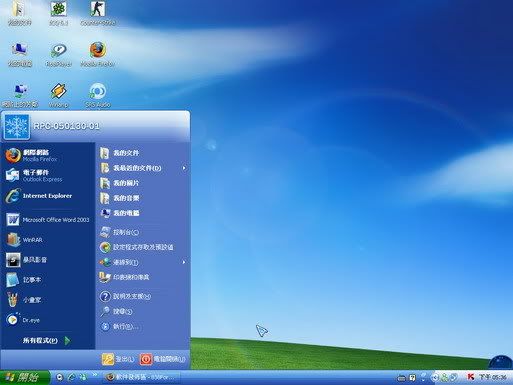
免費WindowsXP淡藍色水晶主題


WindowsXP淡藍色水晶主題


它包括了桌面主題,系統聲音,壁紙,銀幕保護程式……等內容


基於Windows XP MCE 2005 主題 - Energy Blue Theme改制,其中系統舒服的聲音,是這個主題的特色!在看慣了Luna那藍色的臉面或其他第三方主題的千奇百怪後,Royale那淡藍色水晶風格也許能打動你。


下載:

免費xp轉vista樣式軟件Vista Transformation Pack 7

The Vista Transformation Pack is for Windows users who want to replicate the look and feel of Windows on their Windows XP or Windows 2003 systems. After using this desktop enhancement to modify your Windows interface to look like Windows Vista ultimate, no one will notice you're using the same old Windows XP (or 2003) operating system.

1)
下載本軟件
http://www.download.com/Vista-Transformation-Pack/3000-2106_4-10703857.html?tag=lst-0-1

2) 執行安裝程式後,用家可不斷按 "Next>" , 直至去到一版叫你選擇 Where do you want to aply Vista UI.....? 請按Apply Vista UI transformation to system ,接著按Next 2次。

3) 跟住,佢會叫你勾選你想安裝既項目。請全部勾選。

4) 跟住,按Next之後,佢會彈出一個對話框,表名你個OS既版本。按OK。

5) 接著,用家最後可以選擇System font。請選擇第3項,Segoe UI。

6) 最後,系統便會自動重新開機。

7) 開機後,軟件便會繼續完成安裝,完成後,用家只要再重新開機,就可以用了。